Is Cloud Storage Safe? Security, Risks & Best Practices
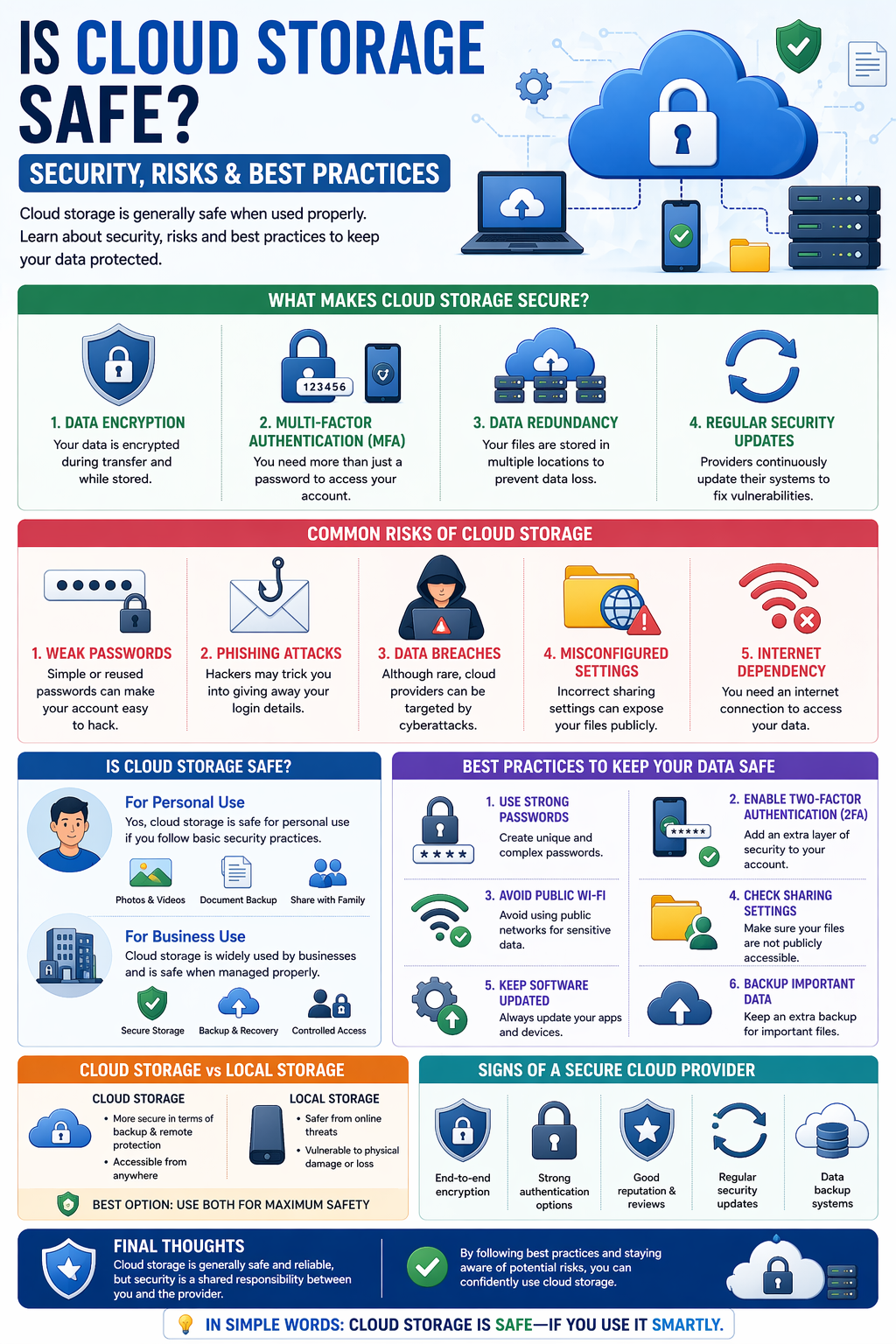
Cloud storage has become a common way to store files, from personal photos to important business data. But one question many people still ask is: Is cloud storage really safe?
The short answer is yes—but only when used properly. In this guide, we’ll explore cloud storage security, potential risks, and best practices to keep your data safe.
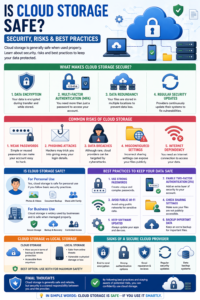
What Makes Cloud Storage Secure?
Cloud storage providers use advanced technologies to protect your data. Here are some key security features:
1. Data Encryption
Your data is encrypted (converted into unreadable code) during transfer and while stored.
2. Multi-Factor Authentication (MFA)
You need more than just a password to access your account—like a code sent to your phone.
3. Data Redundancy
Your files are stored in multiple locations to prevent data loss.
4. Regular Security Updates
Providers continuously update their systems to fix vulnerabilities.
Common Risks of Cloud Storage
Even though cloud storage is generally secure, there are still some risks to be aware of:
1. Weak Passwords
Simple or reused passwords can make your account easy to hack.
2. Phishing Attacks
Hackers may trick you into giving away your login details.
3. Data Breaches
Although rare, cloud providers can be targeted by cyberattacks.
4. Misconfigured Settings
Incorrect sharing settings can expose your files publicly.
5. Internet Dependency
You need an internet connection to access your data.
Is Cloud Storage Safe for Personal Use?
Yes, cloud storage is safe for personal use if you follow basic security practices.
Use cases include:
- Storing photos and videos
- Backing up documents
- Sharing files with family and friends
Is Cloud Storage Safe for Businesses?
Cloud storage is widely used by businesses and is considered safe when managed properly.
Benefits for businesses:
- Secure data storage
- Backup and recovery
- Controlled access for employees
However, businesses should implement strict security policies.
Best Practices to Keep Your Data Safe
Here are some simple but effective ways to protect your data:
1. Use Strong Passwords
Create unique and complex passwords for your accounts.
2. Enable Two-Factor Authentication (2FA)
Add an extra layer of security to your login process.
3. Avoid Public Wi-Fi for Sensitive Data
Public networks can be insecure.
4. Check Sharing Settings
Make sure your files are not publicly accessible unless intended.
5. Keep Software Updated
Always update your apps and devices to avoid security risks.
6. Backup Important Data
Even with cloud storage, having an extra backup is a smart move.
Cloud Storage vs Local Storage: Which is Safer?
- Cloud Storage: More secure in terms of backup and remote protection
- Local Storage: Safer from online threats but vulnerable to physical damage
Best option: Use both for maximum safety.
Signs of a Secure Cloud Provider
When choosing a cloud storage service, look for:
- End-to-end encryption
- Strong authentication options
- Good reputation and reviews
- Regular security updates
- Data backup systems
Final Thoughts
Cloud storage is generally safe and reliable, but security is a shared responsibility between you and the provider.
By following best practices and staying aware of potential risks, you can confidently use cloud storage without worrying about your data.
In simple words:
Cloud storage is safe—if you use it smartly.





Post Comment