On-Page SEO Complete Guide for Beginners
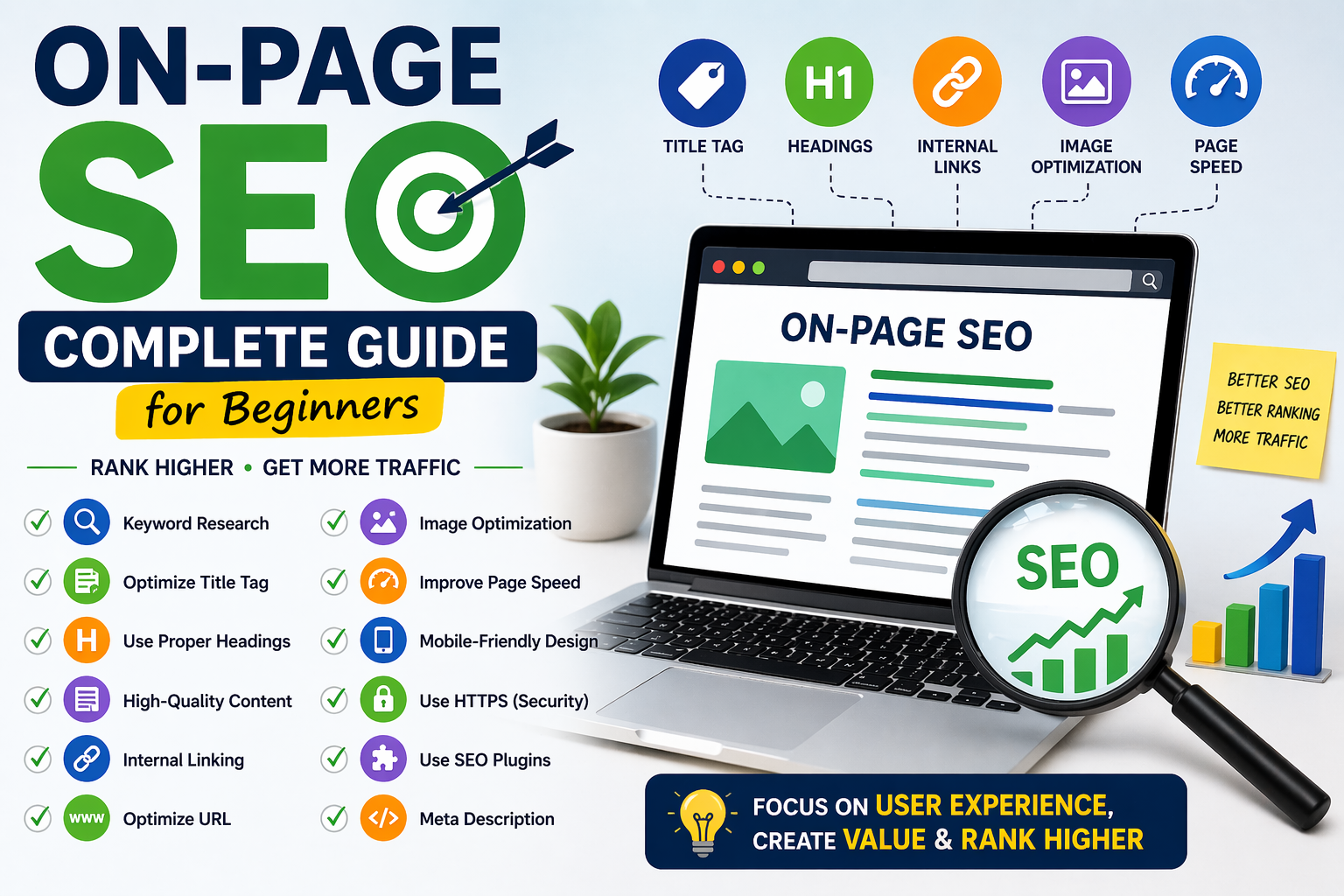
If you want your website to rank on Google and get free traffic, learning On-Page SEO is a must. This guide will walk you through everything step-by-step in a simple and beginner-friendly way.
🔍 What is On-Page SEO?
On-Page SEO refers to all the optimizations you do inside your website to improve rankings on search engines like Google.
It includes:
- Content optimization
- Title & headings
- Internal linking
- Image optimization
- URL structure
👉 In simple words: Make your page better for users + search engines
🧠 1. Keyword Research (Foundation)
Before writing any content, you must find the right keywords.
Example:
Instead of writing:
❌ “SEO tips”
Write:
✅ “On-Page SEO for beginners”
Tools you can use:
- Ubersuggest
- Ahrefs
- Google Keyword Planner
👉 Choose keywords with:
- Good search volume
- Low competition
🏷️ 2. Optimize Title Tag
Your title is the first thing users see on Google.
Tips:
- Include your main keyword
- Keep it under 60 characters
- Make it catchy
👉 Example:
On-Page SEO Guide for Beginners (Step-by-Step)
🧾 3. Use Proper Headings (H1, H2, H3)
Structure your content properly:
- H1 → Main title
- H2 → Sections
- H3 → Sub-sections
👉 This helps both users and search engines understand your content.
✍️ 4. Write High-Quality Content
Content is king 👑
Your content should be:
- Helpful
- Easy to read
- Original
- Detailed
👉 Avoid copying content (Google penalizes it)
🔗 5. Internal Linking
Link your blog posts to each other.
Benefits:
- Improves SEO
- Increases time on site
- Helps users navigate
👉 Example: Link your “WordPress blog guide” to this post
🌐 6. Optimize URL Structure
Keep your URLs short and clean:
❌ example.com/p=123
✅ example.com/on-page-seo-guide
🖼️ 7. Image Optimization
Images make your content engaging, but you must optimize them:
- Use descriptive file names
- Add ALT text (important for SEO)
- Compress images for speed
⚡ 8. Improve Page Speed
Fast websites rank better.
Tools to check speed:
- Google PageSpeed Insights
Tips:
- Use lightweight themes
- Compress images
- Use caching plugins
📱 9. Mobile-Friendly Design
Most users visit from mobile 📱
👉 Make sure your site:
- Loads fast on mobile
- Looks clean
- Is easy to navigate
🔒 10. Use HTTPS (Security)
Google prefers secure websites.
👉 Make sure your site uses:
- SSL Certificate
- HTTPS URL
🧩 11. Use SEO Plugins (For WordPress)
If you use WordPress, plugins make SEO easy:
- Yoast SEO
- Rank Math
These help you:
- Optimize content
- Add meta tags
- Improve readability
📊 12. Meta Description Optimization
This is the short description shown on Google.
Tips:
- Include keyword
- Keep it under 160 characters
- Make it attractive
🚀 Final Thoughts
On-Page SEO is the foundation of ranking on Google. If you ignore it, your content will never reach its full potential.
Focus on:
- Quality content
- Proper structure
- User experience
👉 Do this consistently, and your traffic will grow 📈
✅ Quick Checklist
- ✔ Keyword added in title
- ✔ Headings properly used
- ✔ Internal links added
- ✔ Images optimized
- ✔ Fast loading speed
- ✔ Mobile-friendly design
💡 Pro Tips
- Don’t overuse keywords (avoid keyword stuffing)
- Write for humans first, search engines second
- Update old content regularly





Post Comment